Photomath shows written steps for a math problem you scan, and its core steps cost nothing. If you want someone to explain out loud instead, the main options are Gauth's AI Live Tutor on a whiteboard in its app, Gemini Live and ChatGPT voice on your phone, Khanmigo's read-aloud, and DuckyHelper, an AI you talk to on a Mac, Windows or Linux. Mathway and Symbolab give written steps on the web.
Photomath and the alternatives, side by side
| Option | How it explains | Out loud | Where it works |
|---|---|---|---|
| Photomath | Written steps for a scanned problem | None found | iPhone, iPad, Android |
| Gauth | Steps from a photo, a Live Tutor on a whiteboard | Yes | Phone apps and web |
| Google Gemini | Guided Learning, step by step | On phones and tablets | Web, phone, desktop |
| ChatGPT | Study mode, step by step | Yes | Web, phone, Mac, Windows |
| Khanmigo | Guides you next to Khan Academy's lessons | Reads replies aloud | Web (US only) |
| DuckyHelper (our product) | Each step out loud, hint first, checks your work | Yes, live | Mac, Windows and Linux apps |
| Mathway | Written steps for a typed or photographed problem | No | Web and phone apps |
| Symbolab | Written steps, practice quizzes, a Chrome extension | No | Web, phone, Chrome |
Checked on each product's own pages and app listings on November 3, 2026; sources are at the end. Subjects and limits are in the options below. Prices change often, so cost is described in words.
We make DuckyHelper, and it is on this list
We placed it where our criteria put it and said where it falls short. If a fact here has changed, email support@duckyhelper.com and we will fix it.
Why people look beyond Photomath
Photomath does one job well: point your phone at a math problem, even a word problem, and read a worked solution. Google says its core step-by-step solutions will always cost nothing. People look elsewhere when they want the steps explained out loud, when their homework is on a computer or a Chromebook (Photomath is a phone and tablet app), when the subject is not math, or when they want practice after the problem.
The options
Gauth
Good for: photo homework help with a voice. Snap or upload a problem for step-by-step guidance in most school subjects. Its AI Live Tutor explains by voice while it works on a virtual whiteboard, and it turns your notes, audio or lecture links into quizzes and flashcards. Human subject experts are on call too.
Watch out: its paid plan is sold on "Unlimited Answers", so it is easy to copy instead of learn. It works from photos and uploads, not from your live screen.
Google Gemini (Guided Learning and Live)
Good for: a guide on a Free plan, in any subject. Guided Learning asks open-ended questions and breaks a problem down step by step. On Android, iPhone and iPad, Gemini Live talks with you and can see your camera, so you can point it at the page.
Watch out: Live is not in the Gemini web app. Ages 13 and up; a parent can give a younger child access through Family Link. DuckyHelper vs Gemini.
ChatGPT
Good for: voice on every plan and a study mode that guides you. Upload a photo of the problem, turn on study mode, and ask it to explain one step at a time.
Watch out: OpenAI says study mode may sometimes give a direct answer. Ages 13 and up, with a parent's permission under 18. DuckyHelper vs ChatGPT.
Khanmigo
Good for: guided tutoring next to Khan Academy's courses. Khanmigo says it never gives you the answer. In its Tutor Me activity you attach a photo of a math or science problem, and it can read its replies aloud.
Watch out: you sign up yourself only at 18 and in the US; a parent signs up children. We found no live voice conversation. Khanmigo alternatives.
DuckyHelper (our product)
Good for: an AI that explains out loud and shows each step, in any subject. Open the photo, PDF or homework site on your computer and press fn: it reads the question with you, writes a short hint beside it, circles the line where things went wrong, and checks what you wrote, without saying the answer. Afterwards it can quiz you on similar problems.
Watch out: it is new and has no phone app. It has no free plan (you can try it for 10 minutes with no card, then Plus at 30% off for your first 3 months), and its plans cost more than the solvers here. It is an app for Mac, Windows and Linux, with no web version. DuckyHelper vs Photomath.
Mathway
Good for: written steps in a browser. Type or photograph a problem from basic math through calculus, statistics, chemistry and physics, and Mathway walks through every step. It is from Chegg.
Watch out: there is no tutor and no voice: you read the steps.
Symbolab
Good for: math steps plus practice. Symbolab breaks a problem down step by step, has practice quizzes and a progress dashboard, and its Chrome extension screenshots a math problem on any web page. Its Chrome extension is listed by Course Hero Symbolab Ltd.
Watch out: no voice, and some features are part of a paid subscription.
How we picked
- It helps with the job people use Photomath for, and most of these explain out loud.
- Students can use it today.
- Its platforms and subjects are published, or we say we could not find them.
- Every fact comes from the product's own pages or app listing, checked November 3, 2026.
Who should pick which
Who should pick which
- Quick steps for a problem on paperKeep Photomath. Its core steps cost nothing.Open
- A voice on your phoneGauth's AI Live Tutor, Gemini Live or ChatGPT voice.
- Talk it through on your computerDuckyHelper: help on your own Mac screen.Open
- Written steps in a browserMathway or Symbolab.
- Khan Academy's coursesKhanmigo, if you are in the US.Open
- Help beyond mathGauth, Gemini, ChatGPT or DuckyHelper.
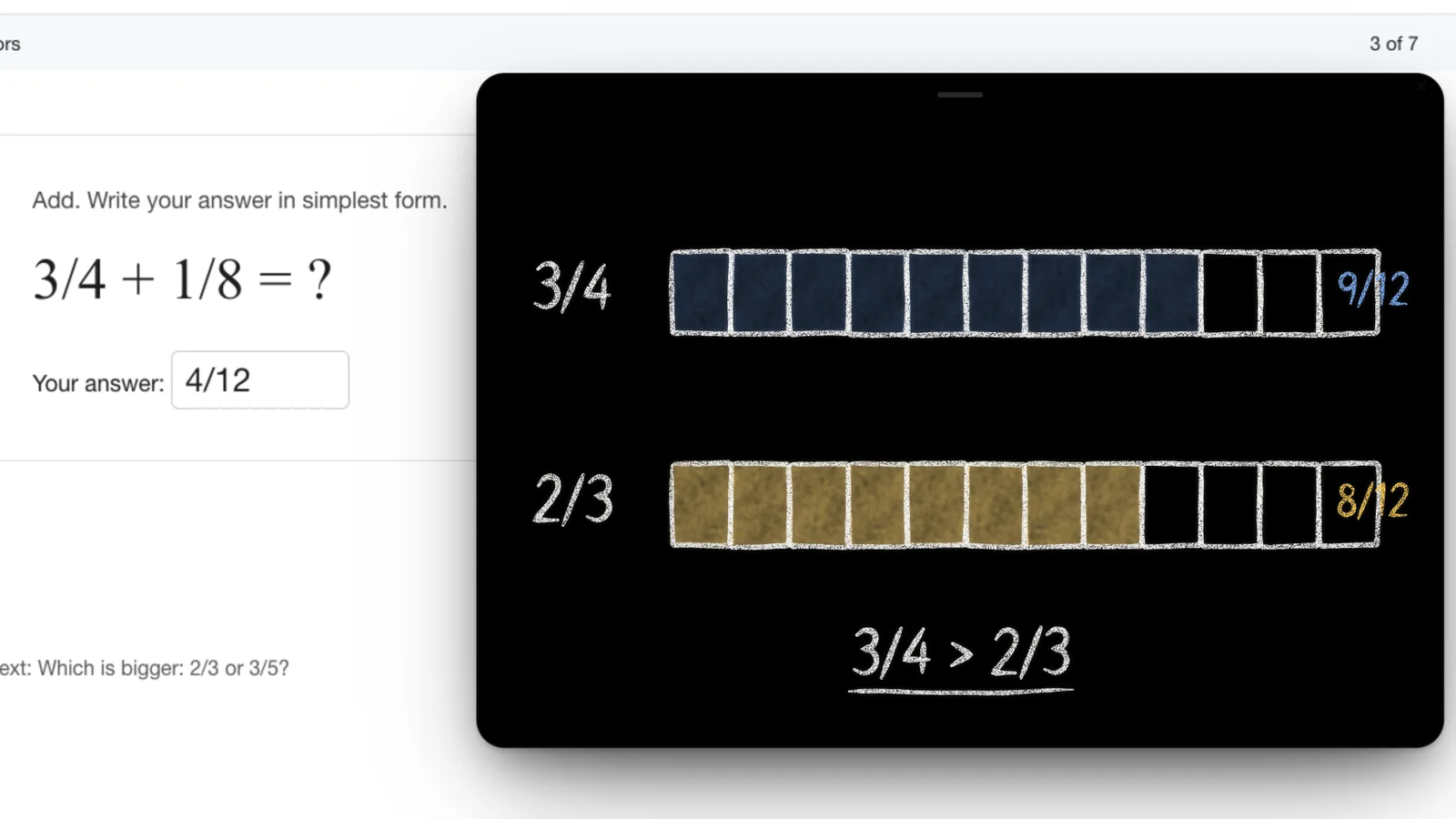
See which fraction is bigger.
It cuts both into twelfths on the board, so the answer is right there.
Try it on your own work
Press fn on a Mac (Ctrl+Shift+Space on Windows and Linux) and say it out loud. It sees your screen, so it works on your own problem with you, and shows you.
- “Is my answer right?”
DuckyHelper is an app for Mac (Apple silicon, macOS 14 or later), Windows and Linux.
Questions
Is there a Photomath for computers?
Photomath is an iPhone, iPad and Android app, and we found no web version. Mathway, Symbolab and Gauth work on the web, and Symbolab's Chrome extension can screenshot a math problem on any page. DuckyHelper is an app for Mac, Windows and Linux, with no web version.
Which Photomath alternative explains out loud?
Gauth's AI Live Tutor explains by voice on a whiteboard in its app. Gemini Live and ChatGPT voice talk you through a problem on your phone, and Khanmigo reads its replies aloud. DuckyHelper is a live conversation in its app for Mac, Windows and Linux; it has no free plan (you can try it for 10 minutes with no card, then Plus at 30% off for your first 3 months).
Which one gives hints instead of answers?
Khanmigo says it never gives you the answer. ChatGPT's study mode and Gemini's Guided Learning guide you with questions, though OpenAI says study mode may sometimes give a direct answer. DuckyHelper gives a hint first and the answer last. Gauth's paid plan is sold on unlimited answers.
Which ones can I use at no cost?
Photomath's core step-by-step solutions cost nothing, and Google says they always will. ChatGPT's study mode and Gemini's Guided Learning are on their Free plans. DuckyHelper has no free plan: you can try it for 10 minutes with no card, then Plus at 30% off for your first 3 months.
Sources
- Photomath (accessed 2026-11-03)
- Photomath Help: Photomath Plus overview (accessed 2026-11-03)
- Photomath on the App Store (accessed 2026-11-03)
- Gauth (web homework helper) (accessed 2026-10-09)
- Gauth website (archived 2026-10-28) (accessed 2026-11-03)
- Gauth on the App Store (AI Live Tutor, study converter, experts) (accessed 2026-11-03)
- Google blog: Guided Learning in Gemini (accessed 2026-11-03)
- Gemini Help: Gemini Live (accessed 2026-11-03)
- Google Families Help: Gemini Apps for your child (accessed 2026-11-03)
- ChatGPT Help: using study mode (archived 2026-09-21) (accessed 2026-11-03)
- ChatGPT Help: ChatGPT Voice (archived 2026-10-30) (accessed 2026-11-03)
- OpenAI terms of use (archived 2026-11-02) (accessed 2026-11-03)
- Khanmigo: for learners (accessed 2026-11-03)
- Khan Academy Help: images you can upload to Khanmigo (accessed 2026-10-09)
- Mathway (accessed 2026-11-03)
- Mathway Premium terms (Mathway, LLC, a subsidiary of Chegg) (accessed 2026-11-03)
- Symbolab (accessed 2026-11-03)
- Symbolab Chrome extension (accessed 2026-11-03)
- Symbolab on the App Store (accessed 2026-11-03)
- DuckyHelper pricing (accessed 2026-11-03)

 Get started