

DuckyHelper press kit
DuckyHelper is an AI that is always there on your computer. It sees your screen and shows you, and in the Mac app it does the work for you.
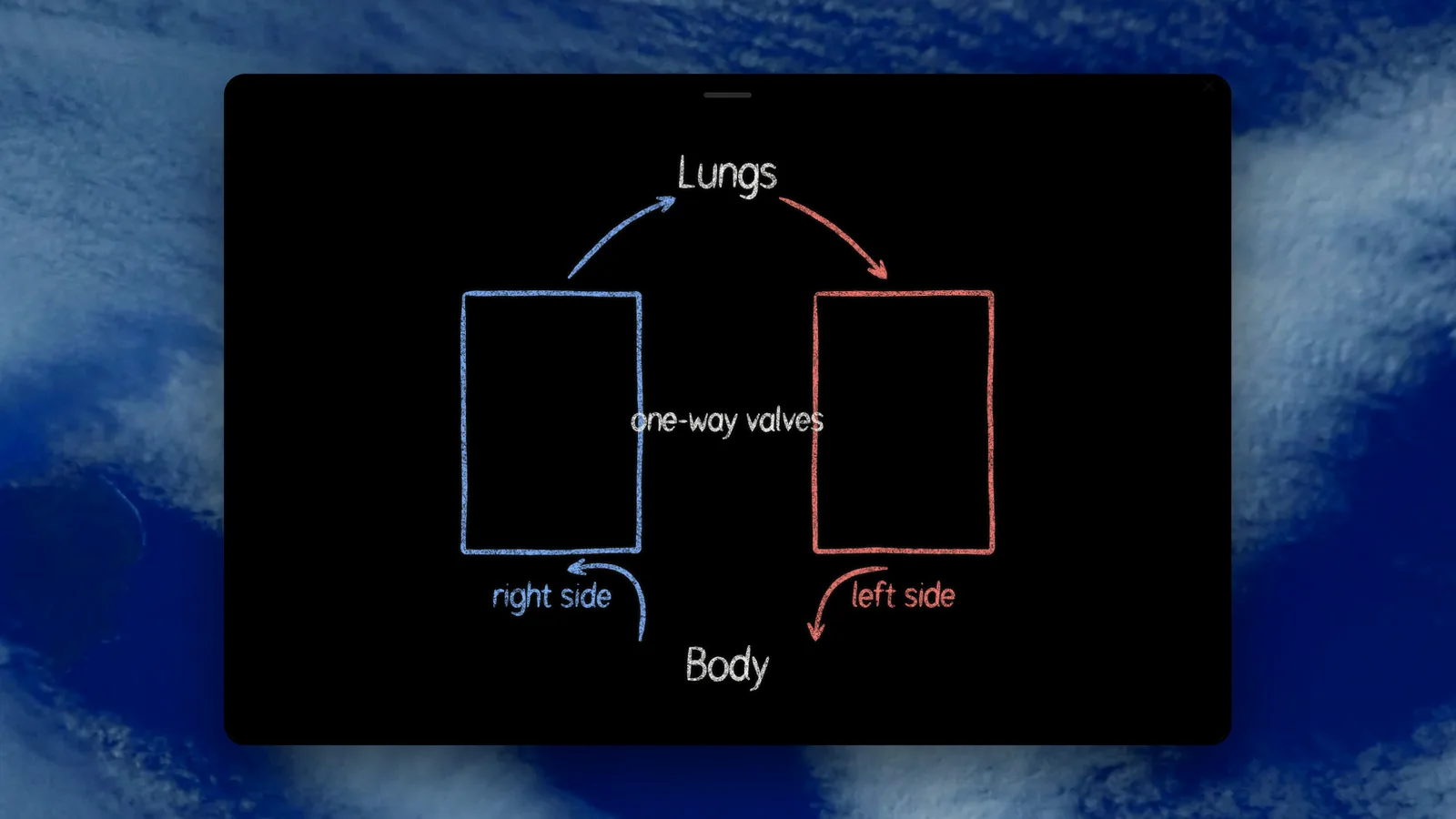
 Ask how the heart pumps and it draws both pumps, each line on the word it says.
DuckyHelper is an AI that is always there on your computer, made by MingLLM, Inc., a Delaware corporation. In its app for Mac, Windows and Linux, press its key in any app and ask out loud: it sees your screen and shows you, on it or on a blackboard. On a Mac, it also does the work for you in any app. It was first released on October 1, 2026, and built by Yiming Beckmann. Press questions: hello@duckyhelper.com.
It draws on what you're looking at.
How does your screen make yellow? It labels the photo you have open: red and green light, no blue.
Sees your screenYour code, drawn as a tree.
fib(50) never finishes. It asks you why, then draws every call and rings the ones it repeats.
Computer scienceBoilerplate
50 words
DuckyHelper is an AI that is always there on your computer, in an app for Mac, Windows and Linux. Press one key in any app and ask out loud: it sees your screen and shows you, and in the Mac app it does the work for you. It is made by MingLLM, Inc., founded by Yiming Beckmann.
100 words
DuckyHelper is an AI that is always there on your computer. Press fn on a Mac (Ctrl+Shift+Space on Windows and Linux) in any app and ask out loud: it sees your screen and shows you, drawing on your work or working it out on a blackboard, in 2D or as a 3D model it builds for the question. On a Mac, it does the work for you in any app with its own cursor, even in a window behind others, and goes all the way without stopping to ask; it's built not to type your passwords or card numbers. People use it for work, everyday jobs and learning. DuckyHelper is made by MingLLM, Inc., a Delaware corporation founded by Yiming Beckmann.
Key facts
- Product: DuckyHelper, an AI that is always there on your computer: it sees your screen, explains and shows you, and does the work for you in any app (on Mac)
- How you use it: press fn on a Mac (Ctrl+Shift+Space on Windows and Linux) and a small pill opens; ask out loud. It listens and looks at your screen only while the pill is open. The menu bar's Talk to Ducky opens the same pill
- Shows you: draws on your real screen while it explains, or works it out on a blackboard, in 2D or as a 3D model it builds for the question
- Does the work (on Mac, for everyone since 0.10.45): works in any app with its own cursor while you keep using yours, even in a window behind others. It does the whole task without stopping to ask, is built not to type your passwords or card numbers for you, and records each task on your Mac so you can watch it again
- Shows you in 3D: builds 3D models live, and whole animated scenes on a background (a rocket launch, a volcano erupting, the water cycle over a landscape)
- Used for: work in the apps a job runs on, everyday tasks, and learning: homework help and test prep in any subject
- Platform: Mac app for Apple silicon and macOS 14 Sonoma or later; Windows and Linux app (a beta) for Windows 10 or 11 and Linux. There is no web or phone version
- Subjects: Any subject, for any learner 13 and up; under 13 only with a parent's verifiable consent
- Built to teach: Trained on 1,000,000+ tutoring examples and built on 100+ learning-science papers
- First released: October 1, 2026. Current Mac version: 0.10.50. The web app at app.duckyhelper.com closed on October 9, 2026
- Pricing: Plus and Max, paid monthly or yearly, and Unlimited, paid weekly, starting with 10 minutes to try with no card, then Plus at 30% off for your first 3 months; no free plan. See Pricing
- Company: MingLLM, Inc., a Delaware corporation
- Founder: Yiming Beckmann, founder and CEO
- Press contact: hello@duckyhelper.com
- Support: support@duckyhelper.com
- On this site: Overview, Use cases and Features
The founder's story
DuckyHelper started with its founder. In his own words: Yiming Beckmann, 14, a grade school dropout; he studied with DuckyHelper and went from 1120 to 1600 on the SAT in two weeks; 117 of 120 on the CLT.
Quoting the founder That is his story, not a promise of anyone else's results. Please quote it as written, and ask hello@duckyhelper.com before contacting him directly: he is a minor.
What makes it different
- It is already there. Press one key in any app and ask out loud, the way you would ask a person next to you. No new tab, no copying your problem into a chat.
- It shows you. It sees your screen and draws right on your work while it explains, or works it out on a blackboard, in 2D or as a 3D model.
- It does the work. On a Mac, it works in any app with its own cursor while you keep using yours, even in a window behind others, and does the whole task without stopping to ask. Stop ends a task, it's built not to type your passwords or card numbers for you, and each task is recorded on your Mac so you can watch it again.
- It shows you in 3D. It builds 3D models live, and whole animated scenes, a rocket launch or a volcano erupting, on a background like a sky and meadow or space.
- When you learn, it teaches. Hints come before answers, quizzes check what stuck, and it checks your own work on your homework instead of writing it for you. More on why DuckyHelper, not a chat window.
Logos
The DuckyHelper mark is a white duck with an orange beak on a black rounded tile. It reads on light and dark backgrounds, so one version is enough. Please don't recolour, stretch or add effects to it.

- duckyhelper-logo.zip, ZIP, 110 KB: The mark as SVG and PNG at 1024, 512 and 256 pixels, rounded and square full-bleed (for sites that crop to a circle)
- duckyhelper-mark.svg, SVG: The mark, vector
- favicon-512x512.png, PNG, 512 x 512: The mark, large
- favicon-256x256.png, PNG, 256 x 256: The mark, medium
- Brand book, web page: The DuckyHelper brand system 2.0, with the mark, colour, type, pictures, motion and voice
Contact
For interviews, facts or files not listed here, including full-resolution films, email hello@duckyhelper.com. For help with the app, email support@duckyhelper.com.
Our films, as they post on X
Press play for sound. These are the films we post on X: six to start with, then every one by the day it posts. To write about one, link to this page or to its post on X rather than re-uploading it.
| On X | Film | Length |
|---|---|---|
| Oct 26 | 0:14 | |
| Oct 27 | 0:43 | |
| Oct 27 | 1:00 | |
| Oct 28 | 0:05 | |
| Oct 29 | 0:51 | |
| Oct 30 | 0:51 | |
| Nov 1 | 0:59 | |
| Nov 2 | 0:38 | |
| Nov 3 | 0:11 | |
| Nov 4 | 0:31 | |
| Nov 5 | 0:35 | |
| Nov 6 | 0:50 | |
| Nov 7 | 0:30 | |
| Nov 8 | 0:49 | |
| Nov 9 | 0:31 | |
| Nov 10 | 0:50 | |
| Nov 11 | 0:08 | |
| Nov 14 | 0:10 | |
| Nov 15 | 1:00 | |
| Nov 16 | 1:08 | |
| Nov 17 | 0:25 | |
| Nov 18 | 0:21 | |
| Nov 19 | 0:38 | |
| Nov 20 | 0:15 | |
| Nov 22 | 1:00 |
Try it on your own work
Press fn on a Mac (Ctrl+Shift+Space on Windows and Linux) and say it out loud. It sees your screen, so it works on your own problem with you, and shows you.
“Show me on the board.”
DuckyHelper is an app for Mac (Apple silicon, macOS 14 or later), Windows and Linux.
Questions
Who makes DuckyHelper?
DuckyHelper is made by MingLLM, Inc., a Delaware corporation. Its founder and CEO is Yiming Beckmann. Press questions go to hello@duckyhelper.com, and help with the app to support@duckyhelper.com.
Is DuckyHelper available now?
Yes. DuckyHelper for Mac (Apple silicon, macOS 14 Sonoma or later) came out on October 1, 2026, and the Windows and Linux app on October 30, 2026, as a beta. Both are on the download page. Doing the work for you in your apps is on Mac, for everyone since version 0.10.45. There is no web or phone version.
How should I describe what it does?
An AI that is always there on your computer. Press fn and ask out loud: DuckyHelper sees your screen and shows you, drawing on it or working it out on a blackboard while it explains out loud, and in the Mac app it does the work for you in any app. Please don't call it a chatbot or an answer app: it shows you, and when you are learning it gives hints first.
Can I use the logo and the films?
Yes, to write about DuckyHelper: use the mark as it is, without changes. For the films, link to them here or to their posts on X rather than re-uploading them; for full-resolution files, email hello@duckyhelper.com.
Keep exploring
About
Who makes DuckyHelper: MingLLM, Inc., a Delaware corporation founded by Yiming Beckmann. What we care about, our startup programs and how to reach us.
OpenResearch
How DuckyHelper is built to teach: the model, a library of 100+ learning-science papers, the principles it follows and our white papers.
OpenFilms
OpenSafety
Is DuckyHelper safe for students? Who it is for, what it collects and why, how long it is kept, who processes it, and the switches learners and parents have.
OpenStudents
AI help with homework and big tests on your computer: ask out loud and it sees your screen and draws the steps right on it while it explains.
OpenFeatures
Every DuckyHelper feature: press one key in any app and ask out loud. It sees your screen and shows you, on a blackboard, in 3D or in ink on your screen, and on a Mac it does the work in your apps with its own cursor.
Open
Questions for the team?
Email hello@duckyhelper.com. For anything about an account, write to support@duckyhelper.com.
Download for MacDo anything
Ask it a question or hand it a job, in any app.




Doing jobs for you is in the Mac app. Asking works on Mac, Windows and Linux.