

What DuckyHelper does, and what it won't.
DuckyHelper is AI voice help for learners 13 and up, for Mac, Windows and Linux: it shows the steps on your teen's screen instead of handing over answers. Teens 13 to 17 need your OK.
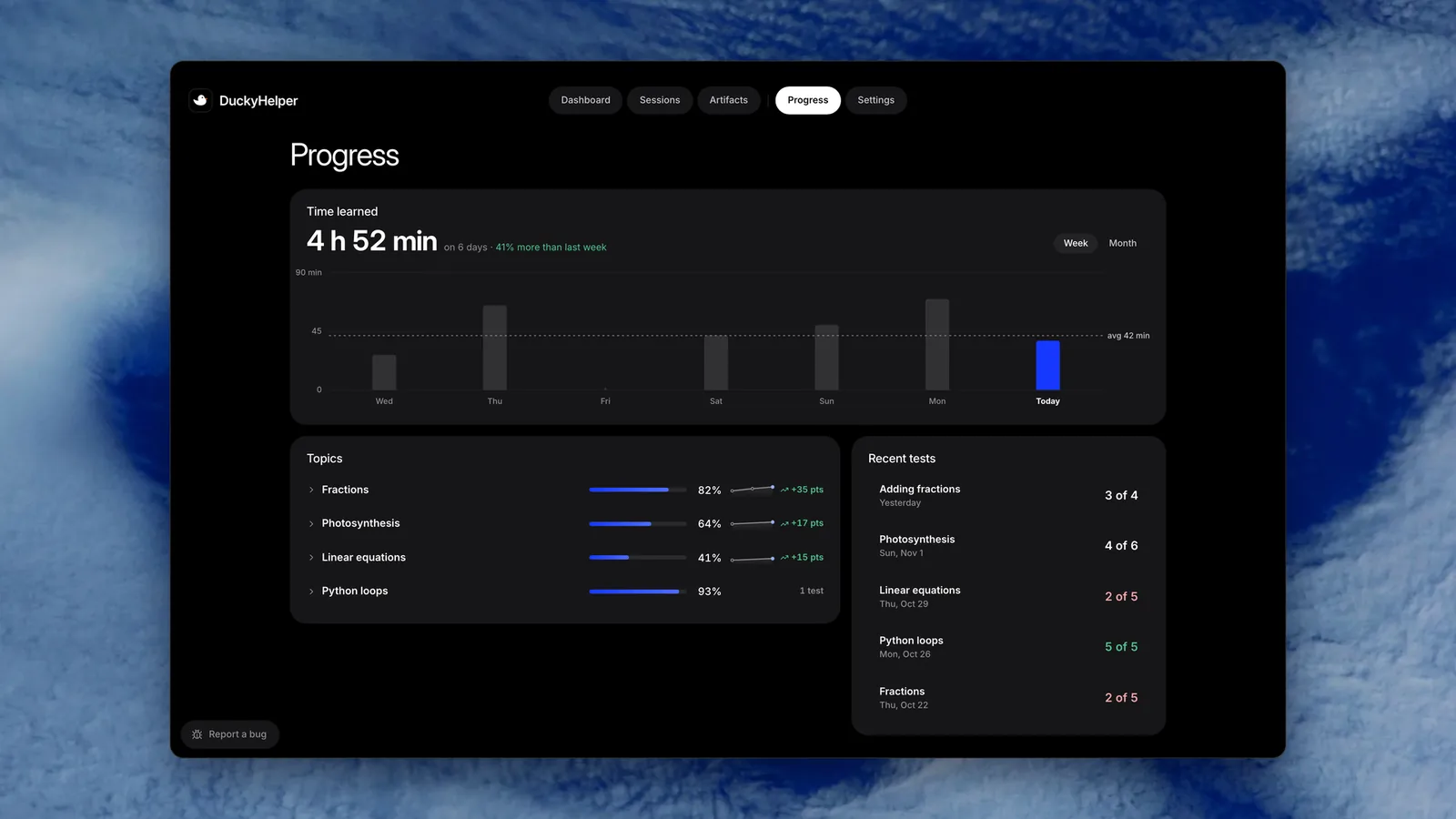
 Time learned, every topic's mastery and every recent test, in Progress.
DuckyHelper is AI voice help for students 13 and up, as an app for Mac, Windows and Linux. Your teen asks out loud; it sees their homework on screen and draws on it while it explains, gives hints before answers and checks their own work. It won't do homework for them. Teens 13 to 17 need your OK, and a child under 13 needs your verifiable consent. There is no family dashboard for now: look at their Dashboard together.
It waits for you.
Why does the river bend? It asks where the water is fastest, lets you answer, then draws what you worked out.
Hints, not answersQuizzes when you ask.
Say quiz me and a quiz rises out of the pill. Miss one and it shows you why.
QuizzesBuilt to teach, not to tell.
“Can you just tell me the answer?” is the question parents worry about, and with reason: in a 2025 study of high school math, students given an AI that handed out answers did better in practice and then worse on the exam than students without it. DuckyHelper asks what your teen thinks first, gives one hint at a time, and checks the work they did.
- Hints before answers
- On a Mac, hints come one at a time: a nudge, a bigger hint, the worked step, the answer last. On their own homework, it gives hints and never says the answer.
- Their own work, checked
- Ask where they went wrong and it marks the line with the slip, so they fix it themselves.
- What it is trained on
- DuckyHelper is trained on 1,000,000+ tutoring examples and built on 100+ learning-science papers. How DuckyHelper teaches explains the research.
Help that shows up when asked.
On a Mac, your teen presses fn and a small pill appears at the bottom of the screen. They talk; it answers out loud and draws circles, arrows and labels over the work they have open. Press fn again and it goes away.
- It acts on the screen only when asked
- Ducky points and draws, and nothing is clicked: it shows how, and your teen does the work. Doing a job in an app with its own cursor is a separate feature, in early access on Mac, and it's built to ask before it sends a message or pays for anything.
- It's built to ask before it sends
- Asked to text someone, it shows a draft. It's built to send it only when your teen taps Send, through their own Messages app.
- The microphone
- Ducky listens while the pill is open. macOS asks before the microphone turns on.
What it sees, hears and keeps
| What | What happens |
|---|---|
| Voice | Sent to the AI service that runs the conversation. Your teen's words are kept as text in the session's transcript, never their own voice. |
| Screen (in the app) | Looked at only while the pill is open, never while a password field has focus, and DuckyHelper's own windows are left out. |
| Lessons and progress | Transcripts, summaries, progress and flashcards are kept so it can pick up where they left off. |
| Training and ads | Not used to train AI models, by us or by the AI service we use. Not sold, and not used for ads. |
| Leaving | Export the data as a ZIP, or delete the account, from Settings. |
The AI service may keep data sent through its API for up to 30 days to check for abuse. The privacy policy has the full details.
See how the week went, together.
There is no family dashboard or parent account in the app for now. What your teen did is on their own computer, in the app's Dashboard, and you can look at it with them.
Their week
Their Dashboard shows their time and every conversation.
Every session
A conversation replays with the board drawing as it was said, and your teen can share one with you by link.
Their own account
It is their account and their computer: what it keeps is on their Mac, and deleting the account erases it.
Ages and consent
Who can sign up, and what a parent does.
- 01
13 and older
A teen can make their own account. From 13 to 17, they need a parent's or guardian's OK.
- 02
Under 13: you are asked first
A child who signs up with an under-13 birthday sees “Ask a parent first” and we email you. Nothing about your child is collected until you say yes.
- 03
A real check
You read what we would collect, choose what's on, and confirm with a 50-cent card check that is refunded right away.
- 04
You stay in charge
From your parent page you can see, download or delete what we keep, change what's on, or withdraw your OK, which deletes the account.
- 05
Payments
A child under 13 can't make payments. Auto top-up is off unless someone turns it on.
The children's privacy notice explains what we collect from a child under 13 and your rights.
Help on a plan, not by the hour.
There is no free plan: you can try it for 10 minutes with no card, then Plus at 30% off for your first 3 months, and bigger plans add more talking time and more of each tool. All plans renew until cancelled in Manage billing. Pricing shows every plan and limit.
What it won't do
Replace a doctor or counselor
It is neither. If a student seems upset, it is told to suggest talking to a trusted adult.Give official grades
Its quiz scores and reports are estimates for learning, not grades or transcripts.Be right every time
It can be confidently wrong. Encourage your teen to check what matters and to tell it when something looks off.Break school rules
Your teen's school rules about AI come first, and it shouldn't be used on tests unless allowed.AI use and academic integrity
Try it on your own work
Press fn on a Mac (Ctrl+Shift+Space on Windows and Linux) and say it out loud. It sees your screen, so it works on your own problem with you, and shows you.
“Is my answer right?”
DuckyHelper is an app for Mac (Apple silicon, macOS 14 or later), Windows and Linux.
Questions
Is DuckyHelper safe for kids?
It is built for learners 13 and up, with limits on what it does: it acts on the screen only when asked, is built to stay out of password fields and to ask before it sends anything, and is told to stay age-appropriate. Children under 13 need a parent's verifiable consent first. No AI is perfect, so check in on how your child uses it.
What age is DuckyHelper for?
Students 13 and up can make an account, with a parent's or guardian's OK from 13 to 17. A child under 13 can use it only after a parent gives verifiable consent through the parent page and a refunded 50-cent card check.
Will my teen just get answers from it?
It is designed to teach: it asks what your teen thinks, gives hints one at a time and checks their own steps. On their own homework it never says the answer. It won't finish or submit work, and school rules about AI still apply.
Is my child's data used to train AI?
No. Neither we nor the AI service we use train AI models on your child's voice, screen, files or lessons, and we don't sell the data or use it for ads. You can export or delete it from Settings.
Can I see what my teen is learning?
Not from your own account for now: there is no family dashboard or parent report in the app. Look at their Dashboard with them, or ask them to share a conversation with you by link.
Is it cheaper than a private tutor?
It is priced as a monthly plan rather than by the hour, and you can try it for 10 minutes with no card, then Plus at 30% off for your first 3 months. A human tutor brings things it can't, so many families use both. Pricing shows the current plans.
Is DuckyHelper free?
No, there is no free plan. A new account can talk with DuckyHelper for 10 minutes, once, with no card. After that it needs a plan, starting with Plus at 30% off for your first 3 months. The pricing page has every price and what each plan includes.
Keep exploring
Mac
DuckyHelper for Mac: over every app, it sees your screen, talks and draws on it. What it needs, how to set it up, and what only the Mac app does.
OpenLanguage learning
Learn a language out loud: hear a word slowly, say it and get each word scored, talk through grammar, and keep the words you miss as flashcards.
OpenChildren's Privacy Notice
Kids under 13 need a yes from a parent or guardian to use DuckyHelper. What we keep until then, how parents say yes, and how they see, change or delete it.
OpenPrivacy
What DuckyHelper, by MingLLM, Inc., collects, why, who processes it, how long it is kept, and your choices and rights.
OpenHomeschool
Voice help for a homeschooled teen in every subject, with simulations, steps, quizzes and flashcards, and a family dashboard for the parent.
OpenSafety
Is DuckyHelper safe for students? Who it is for, what it collects and why, how long it is kept, who processes it, and the switches learners and parents have.
Open
Try it before your teen does
Ask it a question you know the answer to, and see how it teaches, on your computer.
Download for MacDo anything
Ask it a question or hand it a job, in any app.





Doing jobs for you is in the Mac app. Asking works on Mac, Windows and Linux.