

ACT prep, one question at a time.
DuckyHelper helps with ACT prep by going over the practice questions you missed, out loud: it marks what each question needs on your screen, works it through on a blackboard and quizzes you.
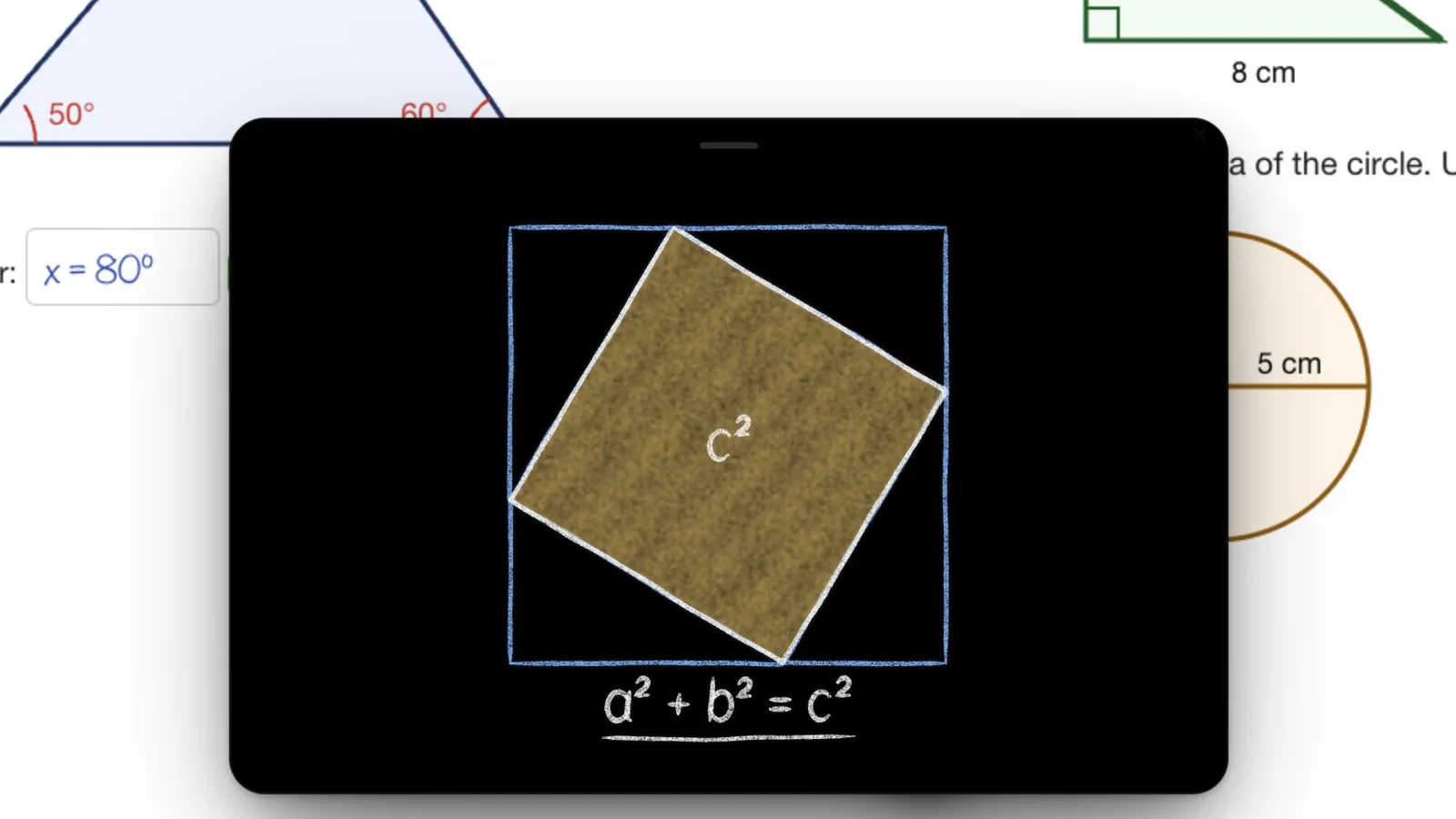
 Four triangles in a square, drawn line by line, until the proof is on the board.
DuckyHelper helps with ACT prep by going through the practice questions you missed, out loud. Press its key (fn on a Mac) and ask: Ducky spotlights the part of a chart or passage the question needs, marks the slip in your math, then quizzes you on the rules you keep missing. Ask it to explain and it works it through on the blackboard, then hands you one to try. It is for studying, never for the test itself.
It asks you first.
23 people in a room. Before it tells you, it asks how many pairs there are, then joins all 253.
Hints, not answersQuizzes when you ask.
Say quiz me and a quiz rises out of the pill. Miss one and it shows you why.
Quizzes“Which part of this graph do I actually need for question 12?”
Most of a science passage is noise. That is the right question for ACT Science, and you can ask it out loud. On a Mac, Ducky can dim everything else on your screen and light up the one column or line the question is about.
Every section, talked through.
What a session looks like for each part of the test.
- English
The rule behind the miss
Ask why a choice is wrong and Ducky names the rule, like a comma splice or a verb that doesn't agree. Then say “quiz me on that rule” for five quick ones. Miss one and it tells you why, and the rule is kept as a flashcard.
- Math
Find the slip yourself
Ask “where did I go wrong?” On a Mac, Ducky circles the line with the mistake and says what to look at. Ask for the steps and it walks you through each one, a mark at a time.
- Science
Read the chart, then try it
Ducky can spotlight the part of the table or graph the question needs and label what changed. For the idea behind a question, ask for a simulation, like a pendulum, and change it to see what happens.
- On the blackboard
Worked on the blackboard
Ask DuckyHelper to explain and a blackboard opens beside your work where it works the idea through, then gives you a quick check. Open a practice page on your computer and it reads the questions with you.
Keep the review going.
The rules and formulas you miss come back as flashcards right before you would forget them. Progress shows your topics and your recent tests over time, so you can see which section needs the next hour.
- Another round on what you missed
- Ask Ducky for another round on the questions you got wrong, and it quizzes you on them again in the pill.
- Slips, not scores
- Mistakes collects the slips Ducky noticed, like mixing up a subject and its verb, so a little practice can make them go away.
Five ways to use it for the ACT
A loop for the weeks before test day.
- 01
Take a timed practice test
Use ACT's own practice tests and keep your own clock: DuckyHelper doesn't time sections.
- 02
Sort the misses by section
English, math, reading and science misses need different kinds of help.
- 03
Talk through each miss
Ask why, find the slip, and redo the question before you check the key.
- 04
Quiz the rule behind it
Five quick questions on one rule at a time, like commas or slope.
- 05
Review your cards daily
A few minutes a day keeps the rules you missed from slipping.
Taking the SAT too? The SAT to ACT conversion compares your scores, and DuckyHelper for SAT prep covers that test.
What it won't do
Help during the real ACT
Don't use DuckyHelper during any test unless you're allowed to.Ship official tests
It isn't connected to ACT and has no official practice tests. Use your own practice material.Time you
There is no section timer. Keep your own clock for timed practice.Be right every time
If something disagrees with the answer key, tell Ducky and check it.AI use and academic integrity
Private by default.
On a Mac, Ducky looks at your screen only while the pill is open, and never while a password field has focus. We don't sell your data, and neither we nor the AI service we use train AI models on it.
Try it on your own work
Press fn on a Mac (Ctrl+Shift+Space on Windows and Linux) and say it out loud. It sees your screen, so it works on your own problem with you, and shows you.
“Why is C the answer and not B?”
DuckyHelper is an app for Mac (Apple silicon, macOS 14 or later), Windows and Linux.
Questions
Can DuckyHelper help with ACT Science?
Yes. On a Mac, ask about a chart or table on your screen and Ducky can spotlight the part the question needs and label what changed. For the idea behind a question, it can open a small simulation, such as a pendulum or a circuit, so you can change it and see what happens.
Does DuckyHelper include ACT practice tests?
No. DuckyHelper isn't connected to ACT and has no official tests. Open your own practice questions and ask about them, or ask for a short quiz on one skill, like comma rules or slope.
Can it time my practice sections?
No, there is no section timer. Use your own clock for timed practice, then bring the questions you missed to DuckyHelper and go through them one at a time.
Is it OK to use DuckyHelper during the ACT?
No. Don't use DuckyHelper during the ACT or any test unless you're allowed to. Use it to study before the test and to understand your mistakes after practice.
Does it work on a Chromebook?
Not yet: DuckyHelper is an app for Mac, Windows and Linux, and it isn't on Chromebooks yet. Join the waitlist on the download page to hear when it is. There is no web version. In the app, it explains on the blackboard and with worked steps that rise out of the pill, and spotlights and marks your own screen.
Keep exploring
Homework help
Homework help in any subject that leaves the work to you: it points at your mistake, gives one hint at a time and checks what you wrote.
OpenMath homework
Math homework help that checks your own working line by line, marks where it went wrong and lets you fix it. Steps, the blackboard and hints when you need them.
OpenEssay help
Essay help that keeps the writing yours: it reads your draft, asks about your thesis, marks what is unclear and helps you plan. It never writes it for you.
OpenCollege students
Study from your own lecture slides, PDFs and notes: ask about them out loud, get quizzed on them, and keep what you miss as flashcards, on your computer.
OpenACT score calculator: Composite and STEM
Work out your ACT Composite from your English, math and reading scores, with the 2025 rule that leaves science out, plus your STEM score. Free, with the math.
OpenSAT to ACT conversion: the official concordance
Convert an SAT total to an ACT Composite, or ACT to SAT, with the official 2018 ACT/SAT concordance tables from ACT and College Board. Full chart included.
Open
Bring your last practice test
Go through every miss out loud, then drill the rules behind them, on your computer.
Download for MacDo anything
Ask it a question or hand it a job, in any app.




Doing jobs for you is in the Mac app. Asking works on Mac, Windows and Linux.