

Study from your own slides.
DuckyHelper helps college students study from their own slides, PDFs and notes: ask about the page on your screen and it draws the idea out, works it on a blackboard and quizzes you.
 Twice as wide is four times the pizza: it plots the area against the width and rings the point.
DuckyHelper helps college students study from their own course material. Open your lecture slides, a PDF or your notes on your computer, press fn and ask about them: it sees the page with you and draws on it while it explains, works the harder ideas through on the blackboard, and quizzes you. Keep files in Memory to ask about them later.
An equation, as a picture.
It turns the photosynthesis equation on your page into a picture of what goes in and what comes out.
Chemistry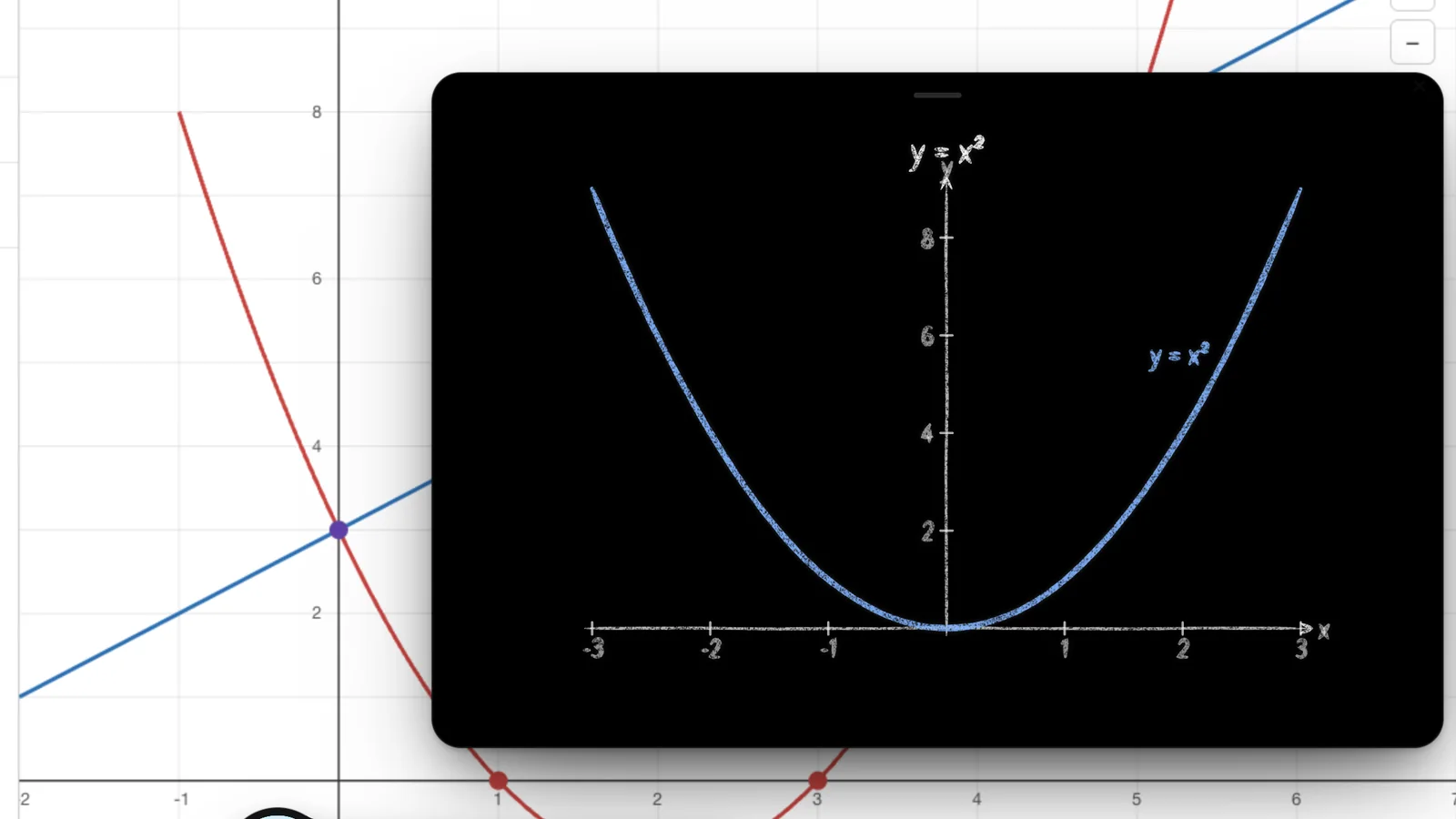
“What did lecture 6 say about eigenvalues?”
Your course, not a generic one. Keep your slides, PDFs and notes in Memory and DuckyHelper finds the part you mean while you talk, in this session or a later one.
From the slides to the exam.
Four moves that cover most of studying for a midterm.
- Load the course
Your files, kept
Open slides, PDFs, Word files or spreadsheets on your computer, or add them to Memory. Ask about any page and DuckyHelper points at the part it means, right on your screen.
- Problem sets
Hints, then your work checked
With a problem open, ask where to start. You get hints one at a time and your own lines checked, so you can do the next one alone.
- Test yourself
Quizzes on the exam topics
Ask to be tested on what the midterm covers. Miss one and it tells you why; Progress shows which topics are weakest.
- Keep it
Flashcards that come back
Definitions and formulas you miss are saved as flashcards on a spaced schedule, so they come back right before you would forget them.
Tools for the course you're in.
Computer science
Press fn on your code and the failing test: it circles the line that breaks and gives you a hint, not the fix.
OpenMath, physics, engineering
Worked steps, the blackboard, and simulations like a pendulum, a projectile or a circuit you change yourself.
Humanities
Research that reads Wikipedia, public-domain books and science pages with you and builds a brief with numbered citations.
Languages
Say a word and get each one scored, hear it slowly, and see the stress and the IPA.
Open
Four ways to use it in college
A routine that fits a semester.
- 01
Keep each lecture
After class, put the slides in Memory so you can ask about them any time.
- 02
Explain it back
Tell Ducky the idea in your own words and let it ask what you missed.
- 03
Quiz before you reread
Start a study session with five questions. What you miss shows where to look.
- 04
Review cards daily
A few minutes a day keeps a whole course of definitions from piling up.
Finals coming up? Study for finals with DuckyHelper has a plan for the last week.
What it won't do
Write papers or problem sets for you
Follow your course's AI policy; if it isn't clear, ask your professor.Help during exams
Don't use it during exams or graded quizzes unless you're allowed to.AI use and academic integrityKnow your professor's notation
It only knows what you show it. Give it the syllabus and the slides.Be right on every advanced topic
It can be wrong, especially on advanced material. Check against your notes and textbook.
Your files stay yours.
Files you open are stored privately on your account, and you can see, search and delete everything in Memory. We don't sell your data, and neither we nor the AI service we use train AI models on it.
Try it on your own work
Press fn on a Mac (Ctrl+Shift+Space on Windows and Linux) and say it out loud. It sees your screen, so it works on your own problem with you, and shows you.
“Explain this slide to me.”
DuckyHelper is an app for Mac (Apple silicon, macOS 14 or later), Windows and Linux.
Questions
Can DuckyHelper read my lecture slides?
Yes. Open PowerPoint slides, a PDF, a Word file or Google Slides on your computer, press fn and ask about any page, or add your files to Memory so you can ask about them in later sessions.
Is DuckyHelper good for computer science classes?
Yes. It reads your code on your screen, circles the line where a test fails and gives hints one at a time, and the blackboard draws an algorithm step by step while it explains.
Does it work on a Windows laptop?
Yes. DuckyHelper runs on Windows 10 or 11, on a Mac and on Linux. Get it on the download page. In the browser it does conversations, the blackboard, 3D and memory. Files and quizzes are in the app.
Does it work on Linux?
Yes, in beta. DuckyHelper's Linux app runs on x64 or ARM64, as a .deb or an AppImage, in an X11 session; press Ctrl+Shift+Space to talk. The Windows app is a beta too, and the Mac app needs Apple silicon. Get any of them on the download page.
Can I use it during exams?
No. Don't use DuckyHelper during exams or graded quizzes unless you're allowed to. Use it to study before an exam, and to understand your mistakes after it.
How much talking time do I need?
It depends on how much you study out loud. You can type on every plan, and paid plans add more talking time and more of each tool. Pricing shows the current plans and limits.
Keep exploring
Homeschool
Voice help for a homeschooled teen in every subject, with simulations, steps, quizzes and flashcards, and a family dashboard for the parent.
OpenParents
A parent's guide to DuckyHelper: what it does and won't do, the ages it is for, what it sees and keeps, and how a parent sets it up.
OpenMac
DuckyHelper for Mac: over every app, it sees your screen, talks and draws on it. What it needs, how to set it up, and what only the Mac app does.
OpenCoding interviews
Practice coding interviews out loud: talk through your plan, get one hint at a time, and see the line where your code breaks, marked on your screen.
OpenFinals
Quiz yourself on each class, work through what you miss on the blackboard, and get every miss back as a flashcard before the exam. In the app.
OpenEssay help
Essay help that keeps the writing yours: it reads your draft, asks about your thesis, marks what is unclear and helps you plan. It never writes it for you.
Open
Bring this week's slides
Ask about them, get quizzed on them, and keep what you miss, on your computer.
Download for MacDo anything
Ask it a question or hand it a job, in any app.



Doing jobs for you is in the Mac app. Asking works on Mac, Windows and Linux.