

Any class, any night.
DuckyHelper is voice help for high school students in every class: ask out loud about the homework on your screen and it draws on it while it explains, gives hints first and quizzes you.
 23 people in a room. Before it tells you, it asks how many pairs there are, then joins all 253.
DuckyHelper is voice help for high school students in every class. It is always there on your computer: press fn and ask out loud about the homework or the topic you're stuck on. It sees your screen and draws on it while it explains, or works the idea through on the blackboard, gives hints before answers, and quizzes you on what you just learned.
It writes on the page you're reading.
Twice as fast means four times the energy: it underlines the speed in your textbook and works it out beside it.
PhysicsPlaces in 3D.
Ask how the Colosseum worked and it builds one right on your screen, every part named, so you can turn it.
History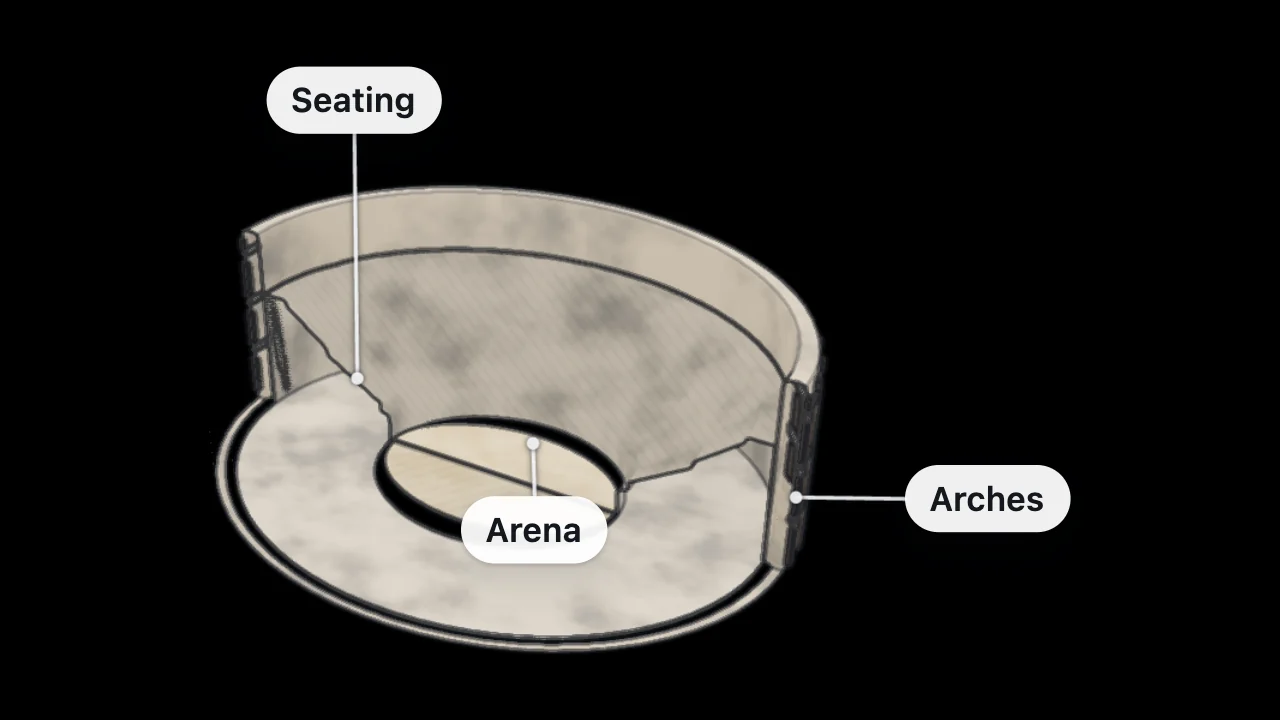
“Why do you feel lighter in an elevator going down?”
Every class starts with a question. A question from physics class, or from nowhere. Ask it out loud and watch it worked through on the blackboard, then the next question it raises, as far as you want to go.
One app for the whole schedule.
The tools change with the class. All of them are in the app.
- Math
Find your own slip
Show your work and ask where you went wrong. The line with the slip gets marked, you fix it, and you get one more like it.
- Science
Change it, see why
Ask for a simulation, like a pendulum, a projectile, a circuit or a titration, and change it yourself to see what happens.
- Languages
Say it out loud
Ask how to say a word, hear it slowly, then say it and get each word scored.
- Test week
Quiz before you reread
Say “quiz me on chapter 6.” Miss one and it tells you why, and it comes back later as a flashcard.
What are you working on tonight?
Homework
Hints one at a time, and your own work checked.
OpenMath homework
The line with the slip, found with you.
OpenAn essay
Questions on your own draft, never a rewrite.
OpenThe SAT
Every practice miss, talked through.
OpenThe ACT
Section by section, out loud.
OpenFinals
A plan for the week, then quizzes and cards.
Open
Five ways to use it in high school
Habits that fit a school night.
- 01
Start with what's due
Open tonight's assignment on your computer, press fn and start on it together.
- 02
Ask for a hint, not the answer
The smallest push first. You learn more from the step you take yourself.
- 03
Quiz yourself before a test
Five questions on one topic show you what you actually know.
- 04
Review your cards
A few minutes a day, and the things you missed come back right before you'd forget them.
- 05
Follow a question
When something makes you curious, ask. One question leads to the next.
Checking your grades? The GPA calculator and the grade calculator do the math.
For you, and for your parents.
Students 13 to 17 can make their own account with a parent's or guardian's OK. A family dashboard is off unless you turn it on, and you always see who is linked and what they can see.
- Ages 13 and up
- Family off by default
Try it on your own work
Press fn on a Mac (Ctrl+Shift+Space on Windows and Linux) and say it out loud. It sees your screen, so it works on your own problem with you, and shows you.
“Help me with number 3.”
DuckyHelper is an app for Mac (Apple silicon, macOS 14 or later), Windows and Linux.
Questions
Can high school students use DuckyHelper?
Yes. It is made for students 13 and up. If you are 13 to 17, you need a parent's or guardian's OK, which sign-up asks you to confirm. Then it works for any class, on your computer.
Does it work on a school Chromebook?
Not yet: DuckyHelper is an app for Mac, Windows and Linux, and it isn't on Chromebooks yet. Join the waitlist on the download page to hear when it is. There is no web version. In the app, press Ctrl+Shift+Space and talk to it, and it marks your own work on screen.
Is there an app that talks me through homework instead of giving answers?
Yes, that is what DuckyHelper is built for. Ask out loud about the problem on your screen: it points at the part that matters, gives a hint first, lets you try the next step and checks it. It is an app for Mac, Windows and Linux, for ages 13 and up.
Is it cheating to use it for homework?
Using it to understand and practice is learning: it gives hints before answers and won't finish or submit work for you. Follow your school's rules about AI, and don't use it on tests unless you're allowed to.
Which classes can it help with?
Any class: math, science, history, English, languages and computer science. It has tools for each, like worked steps and the blackboard for math, simulations for science, quizzes and flashcards for history, and pronunciation for languages.
What does it cost?
There is no free plan: you can try it for 10 minutes with no card, then Plus at 30% off for your first 3 months. Bigger plans add more talking time and more of each tool. Pricing shows the current plans.
Keep exploring
Self-learners
An AI you talk to, for curious people from 13: ask out loud, see it worked through on the blackboard, read the sources with it, and keep what you learn.
OpenFinals
Quiz yourself on each class, work through what you miss on the blackboard, and get every miss back as a flashcard before the exam. In the app.
OpenSAT prep
Study for the SAT with AI help on the questions you missed: see why an answer is wrong, find the slip in your math, then quiz the skills you keep missing.
OpenACT prep
Go through your ACT practice misses out loud: the part of the chart that matters, the slip in your math, then quizzes and flashcards on the rules you miss.
OpenStudents
AI help with homework and big tests on your computer: ask out loud and it sees your screen and draws the steps right on it while it explains.
OpenStudy guides
Free study guides from DuckyHelper, one idea per page: a picture that explains it, a worked example, the common mistakes and a question to try.
Open
Bring tonight's homework
Any class, out loud, with hints before answers, on your computer.
Download for MacDo anything
Ask it a question or hand it a job, in any app.




Doing jobs for you is in the Mac app. Asking works on Mac, Windows and Linux.